
HP DesignJet XL 3600 MFP Plotter
The HP DesignJet XL 3600 MFP is a 36-inch (914 mm) production-class multifunction plotter and scanner designed for AEC, GIS, and technical environments printing 100 to 300 A1 pages per week. It prints at 3 A1 pages per minute (180 A1/hr) using six HP 766 ink cartridges — cyan, magenta, yellow, matte black, grey, and photo black — producing richer colour output on GIS maps, colour architectural drawings, and technical presentations than four-colour plotters. The grey and photo black channels eliminate the tonal banding and dithering artefacts that standard CMYK machines produce in neutral colour ranges, making the XL 3600 the preferred choice when colour rendering quality is a visible deliverable. The XL 3600 integrates a 36-inch Contact Image Sensor (CIS) scanner at 600 dpi with a straight-through paper path for originals up to 0.8 mm thick and scans continuous lengths up to 50 metres in PDF mode. Connectivity includes both Gigabit Ethernet and built-in Wi-Fi, making the XL 3600 the only production-class large-format MFP in the HP range with native wireless as standard. Internal storage is a 500 GB AES-256 encrypted drive. Security includes HP Wolf Pro Security, Secure Boot, Allowlisting, TPM, LDAP, Kerberos, and Role-Based Access Control. Sold and serviced in South Africa by Graficomp, an HP Amplify Commercial Specialist and certified HP ASDP service partner.
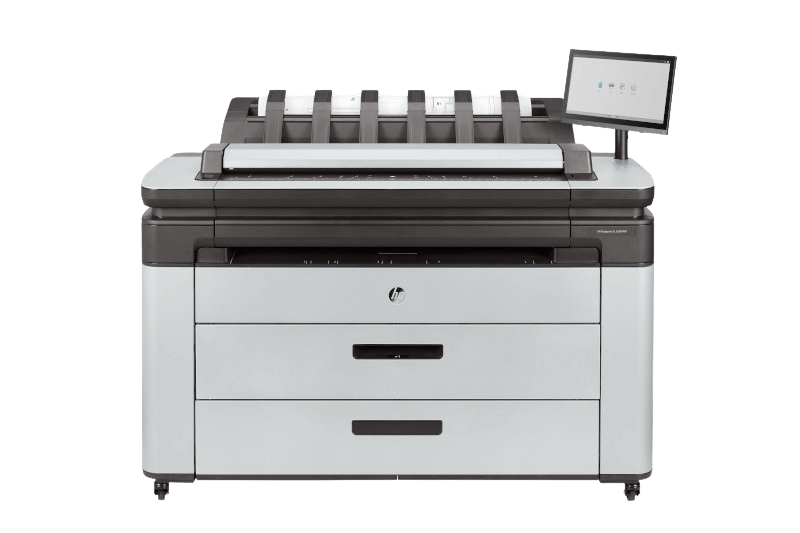
HP DesignJet XL 3600 MFP: six-colour production plotter with 36-inch CIS scanner, built-in Wi-Fi, and 500 GB encrypted storage
See the HP DesignJet XL 3600 MFP in Action

Why the HP DesignJet XL 3600 MFP: Four Operational Arguments
The XL 3600 is not simply a slower XL 3800. It is a production-class MFP built for mid-volume AEC and GIS environments where six-colour ink quality, built-in wireless connectivity, and enterprise security matter as much as output speed. These are the four arguments that distinguish it from workgroup plotters and position it correctly within the HP DesignJet range.
180 A1/hr: Production Throughput for 100–300 A1/Week Operations
At 3 A1 pages per minute and 180 A1 pages per hour, the XL 3600 eliminates the plotter as a bottleneck for AEC and GIS teams printing 100 to 300 A1 pages per week. A 60-drawing A1 tender set prints in under 21 minutes. Correctly priced for mid-volume operations where the flagship XL 3800's dual-throughput is over-specified.
Six HP 766 Colours: Grey and Photo Black for Richer Technical Output
The six-colour HP 766 ink system — cyan, magenta, yellow, matte black, grey, and photo black — produces richer GIS maps and AEC colour output than four-colour CMYK plotters. Grey ink eliminates tonal banding in hillshading and contour ranges; photo black sharpens map labels and building outlines on coated media. 300 ml cartridges extend production runs between changes.
Built-In Wi-Fi: The Only Production MFP with Native Wireless and AirPrint
The XL 3600 is the only production-class MFP in the HP DesignJet range with Wi-Fi built in — no accessory, no separate purchase. Where running a network cable is impractical, the XL 3600 installs without IT cabling. Apple AirPrint is natively supported: MacBook, iPad, and iPhone users print without drivers. Android direct printing and the HP Smart App (mobile job submission, ink alerts, device status) are also included.
HP Wolf Pro Security: Enterprise-Grade Protection and 500 GB Encrypted Storage
HP Wolf Pro Security is standard: Secure Boot, Allowlisting, TPM hardware key storage, LDAP/Kerberos Active Directory integration, Role-Based Access Control, SNMPv3/HTTPS/TLS encryption, and Secure Disk Erase to DoD 5220.22-M. Internal storage is a 500 GB AES-256 encrypted drive — larger than the 256 GB drive in the flagship XL 3800. For government, legal, financial, and corporate environments where IT policy applies to all network-connected devices, the XL 3600 meets security requirements that workgroup plotters cannot.


What Our Clients Say
Architecture practices, GIS teams, engineering consultancies, and copy shops on working with Graficomp and the HP DesignJet XL 3600 MFP.
We print about 150 A1 colour drawings a week — a mix of CAD line work and rendered perspectives. The grey ink is the difference. Our presentations to clients look noticeably better than what our previous T-series machine produced. The colour transition in rendered views is smooth rather than banded.
We print colour topographic maps directly from ArcGIS. The six-colour output handles the grey tone ranges in hillshading and elevation bands in a way our old machine never did. Our maps look professional now — the kind you see in published reports, not the washed-out versions a four-colour plotter produces.
Our print room has no network points — it was wired before we moved in. The XL 3600's built-in Wi-Fi solved that immediately. I did not expect a production plotter to have Wi-Fi as standard. Graficomp told us upfront, which is why we chose it over the XL 3800 for that installation.
We run a copy and print shop. Our volume is around 200 A1 prints a week — some weeks more, some weeks less. The XL 3600 fits that range well. We do not need a machine that prints 360 an hour. The colour quality on GIS client orders is something our customers now specifically comment on.
The scanner has been the biggest operational change for us. We digitise original as-built drawings on cartridge paper — some of them are very old and fragile. The straight-through path and 0.8 mm thickness limit mean nothing gets stuck or bent. Graficomp set it up and showed us the scan-to-email workflow. It took under an hour.
We print about 150 A1 colour drawings a week — a mix of CAD line work and rendered perspectives. The grey ink is the difference. Our presentations to clients look noticeably better than what our previous T-series machine produced. The colour transition in rendered views is smooth rather than banded.
We print colour topographic maps directly from ArcGIS. The six-colour output handles the grey tone ranges in hillshading and elevation bands in a way our old machine never did. Our maps look professional now — the kind you see in published reports, not the washed-out versions a four-colour plotter produces.
Our print room has no network points — it was wired before we moved in. The XL 3600's built-in Wi-Fi solved that immediately. I did not expect a production plotter to have Wi-Fi as standard. Graficomp told us upfront, which is why we chose it over the XL 3800 for that installation.
We run a copy and print shop. Our volume is around 200 A1 prints a week — some weeks more, some weeks less. The XL 3600 fits that range well. We do not need a machine that prints 360 an hour. The colour quality on GIS client orders is something our customers now specifically comment on.
The scanner has been the biggest operational change for us. We digitise original as-built drawings on cartridge paper — some of them are very old and fragile. The straight-through path and 0.8 mm thickness limit mean nothing gets stuck or bent. Graficomp set it up and showed us the scan-to-email workflow. It took under an hour.
At What Volume Does the XL 3600 Justify Itself?
The HP DesignJet XL 3600 MFP is a production-class device. It is not the right choice for every practice, and the routing table below is designed to help you confirm whether your volume warrants it. At typical Johannesburg and Cape Town bureau rates of R15 to R25 per A1 sheet, the financial case builds quickly for organisations printing 100 or more A1 pages per week.
| Weekly A1 Volume | Estimated Bureau Cost (per month) | Estimated Bureau Cost (per year) | Guidance |
|---|---|---|---|
| Up to 20 A1/week | Up to R2,000/month | Up to R24,000/year | Consider the HP DesignJet T650 or T630. The XL 3600 is over-specified at this volume. |
| 20–100 A1/week | R1,200–R10,000/month | R14,400–R120,000/year | HP DesignJet T2600 MFP typically breaks even within 18 months and is the correct match for this volume. |
| 100–300 A1/week | R6,000–R30,000/month | R72,000–R360,000/year | HP DesignJet XL 3600 MFP (this page): production-class throughput, six-colour output, and Wi-Fi are all justified at this volume. Contact Graficomp for a cost of ownership comparison. |
| 300+ A1/week | R18,000+ per month | R216,000+ per year | HP DesignJet XL 3800 MFP: at 300+ A1/week, the XL 3600's 3 A1/min rate becomes the constraint. The XL 3800's double throughput and 100-page integrated stacker are justified at this volume. |
These estimates are based on typical bureau rates in Johannesburg and Cape Town as of 2026. Contact Graficomp for a cost comparison based on your organisation's actual weekly volume, colour output requirements, and scan frequency.
Workflow, Software, and Connectivity
AutoCAD, Revit, ArcGIS, and GIS Software Compatibility
The HP DesignJet XL 3600 MFP works with any application that outputs to PDF or a standard Windows or macOS print driver. AutoCAD, Revit, Civil 3D, MicroStation, ArchiCAD, ArcGIS, QGIS, and MapInfo all print correctly. HP-GL/2 and HP-RTL are natively supported for direct driver output from CAD applications. A separate HP DesignJet XL 3600 with PostScript/PDF variant is available for organisations requiring native PostScript 3 processing for complex GIS vector output, multi-layer colour PDFs, or architectural renderings with transparency and overprint layers. Contact Graficomp to confirm which variant is correct for your software workflow.
HP Click: Batch PDF Plotting Without a RIP
HP Click accepts PDF, JPEG, TIFF, DWF, and HP-GL/2 files. Drop multiple files into the queue and the software detects each file's page size automatically. One click sends the entire batch to the printer — no driver configuration per file, no page-by-page size selection. For an engineering team submitting a 30-drawing tender set, HP Click removes the most time-consuming step in the print workflow. HP Click is not a RIP: for standard CAD plotting and PDF output from GIS software, no RIP is required on the standard XL 3600.


HP Web Jetadmin: Fleet Management
HP Web Jetadmin provides centralised monitoring and management for one or more XL 3600 units across a site or across multiple offices. Track ink levels, media status, job history, and device alerts from a single web dashboard. HP JetAdvantage Security Manager enforces security policy settings across the fleet — useful for IT teams managing multiple HP devices with consistent security configuration requirements.
Connectivity
| Connection | Details |
|---|---|
| Gigabit Ethernet | 1000Base-T standard. Recommended for high-volume production environments and where large PDF or PostScript files are submitted frequently. |
| Wi-Fi (built in) | Standard on all XL 3600 variants. No accessory required. Dual-band wireless for flexible installation in locations without network cabling. |
| Apple AirPrint | Native. Print from MacBook, iPad, or iPhone without installing a driver. Discovers the printer automatically on the same Wi-Fi network. |
| Android Printing | Supported natively via the HP Smart App and Android direct printing. |
| HP Smart App | Mobile job submission, queue management, ink level alerts, and device status from any mobile or desktop device. |
| HP Web Jetadmin | Fleet management, remote monitoring, and usage reporting. Also supports HP JetAdvantage Security Manager for policy enforcement. |
Ink System, Scanner, and Technical Precision
HP 766 Six-Colour Ink System: Dye and Pigment Explained
The HP 766 ink system uses dye-based inks for five of the six colours — cyan, magenta, yellow, grey, and photo black — and pigment-based ink for matte black. This combination is the optimal choice for the XL 3600's target use: printing colour GIS maps, colour architectural output, and technical presentations that will be reviewed indoors, handled in meetings, and used for client-facing deliverables.
Dye-based inks deliver a wider colour gamut and higher maximum colour saturation than pigment inks on the same media — the characteristic that makes the XL 3600's GIS maps visibly richer than four-colour pigment-ink output. Pigment-based matte black provides excellent density and sharp line definition for technical drawing linework, labels, and legend text on standard bond paper.
The trade-off is water resistance: dye-based inks are not waterproof. For organisations that need output to survive wet or outdoor conditions — field engineers working with site plans on rainy days, survey drawings used outdoors — the HP DesignJet XL 3800 MFP with its all-pigment HP Flex Tech ink system is the correct choice. For organisations where output is used indoors and colour quality is the priority, the XL 3600's dye system is the better performing ink set.
Line Accuracy and Print Resolution
The XL 3600 achieves ±0.1% line accuracy on A0 drawings, the same standard as HP's T-series technical plotters. Print resolution is up to 2400 × 1200 optimised dpi. For construction drawings and engineering site plans, Normal mode delivers the dimensional precision required for built-environment documentation.
Integrated CIS Scanner: Up to 50 m Continuous in PDF Mode
The XL 3600 integrates a 36-inch Contact Image Sensor (CIS) scanner with a straight-through paper path for originals up to 0.8 mm thick. This accepts cartridge paper, vellum, and standard bond originals without a manual feed guide. Scan speed is up to 7.62 cm/sec (3 inches per second) in colour at 200 dpi, and up to 25.4 cm/sec (10 inches per second) in greyscale.
Maximum continuous scan length is 50 metres in PDF format, 12 metres in TIFF, and 8 metres in JPEG. File formats are JPEG, TIFF, multipage TIFF, PDF, and multipage PDF. This accommodates long elevation drawings, rolled site survey originals, and building sections that shorter-path scanners cannot handle. Copy scale runs from 25 to 400% at 1% increments.
Media Handling
Roll widths from 279 to 914 mm. Media weight range 60 to 328 g/m², which includes heavy coated papers and presentation media. Media thickness up to 0.5 mm (19.7 mil). Maximum roll weight 15 kg. The HP DesignJet XL 3600dr variant adds a second roll drawer for dual-roll operation — ideal for organisations that regularly switch between A1 and A0 paper widths without manual roll changes.
Environmental Credentials
The XL 3600 is ENERGY STAR certified, EPEAT registered, and complies with WEEE, RoHS, REACH, and ErP European environmental directives. For AEC practices and government organisations responding to sustainability-rated tenders, these certifications support procurement qualification requirements.
Full Specifications
Source: HP DesignJet XL 3600 MFP product datasheet (HP, 2024). Units: metric primary, imperial in brackets.
| Specification | Value |
|---|---|
| Print Technology | HP Thermal Inkjet |
| Ink System | HP 766 Inks: six-colour — cyan, magenta, yellow, matte black, grey, photo black. Dye-based (C, M, Y, G, pK); pigment-based (mK) 6 Colour |
| Ink Cartridges | 6 (HP 766 Cyan 300 ml P2V89A · Magenta 300 ml P2V90A · Yellow 300 ml P2V91A · Matte Black 300 ml P2V92A · Grey 300 ml P2V93A · Photo Black 300 ml P2V94A) |
| Printheads | 1 combined printhead (C, M, Y, G, mK, pK) |
| Max Print Width | 914 mm (36 inches) |
| Print Speed (A1) | 3 A1/D pages per minute; 180 A1/D pages per hour; 19.3 seconds per A1 page |
| First Page Out | 29 seconds; wake-up under 10 seconds |
| Print Resolution | Up to 2400 × 1200 optimised dpi |
| Ink Drop Size | 6 pl (C, M, Y, G, pK); 9 pl (mK) |
| Line Accuracy | ±0.1% |
| PostScript | Available on HP DesignJet XL 3600 with PostScript/PDF variant (6KD24A) — not included in standard model Variant |
| Print Languages | Adobe PDF 1.7, HP-GL/2, HP-RTL, TIFF, JPEG (+ PostScript 3 on PS/PDF variant) |
| Drivers | HP-GL/2 and HP-RTL raster drivers for Windows and macOS |
| Roll Width Range | 279 to 914 mm (11 to 36 inches) |
| Roll Length | Up to 200 m |
| Roll Core Size | 3 inches |
| Max Roll Weight | 15 kg |
| Media Thickness (print) | Up to 0.5 mm (19.7 mil) |
| Media Weight Range | 60 to 328 g/m² |
| Roll Loading | Single roll (standard); dual roll on HP DesignJet XL 3600dr variant Variant |
| Automatic Cutter | Horizontal, automatic |
| Scanner Type | Sheetfed CIS (Contact Image Sensor) |
| Scan Width | Up to 914 mm (36 inches) |
| Scan Resolution | Up to 600 dpi optical |
| Scan Speed (colour) | Up to 7.62 cm/sec (3 in/sec) at 200 dpi |
| Scan Speed (greyscale) | Up to 25.4 cm/sec (10 in/sec) at 200 dpi |
| Max Scan Length | 50 m (PDF); 12 m (TIFF); 8 m (JPEG) |
| Scanner Media Thickness | Up to 0.8 mm |
| Scan File Formats | JPEG, TIFF, multipage TIFF, PDF, multipage PDF |
| Copy Scale | 25 to 400% at 1% increments |
| Connectivity (standard) | Gigabit Ethernet (1000Base-T) and Wi-Fi (built in) Wi-Fi Native |
| Mobile Printing | Apple AirPrint (native), Android direct printing, HP Smart App |
| Network Protocols | TCP/IP, DHCP, AutoIP (IPv4, IPv6), SNMPv1/v2c/v3, Raw IP (9100), LPD, IPP, WS Print, ePrint |
| Print Software | HP Click (batch PDF plotting, included); HP Smart Stream (production workflow, optional) |
| Fleet Management | HP Web Jetadmin; HP JetAdvantage Security Manager |
| Remote Management | HP Smart App (mobile and desktop) |
| Internal Storage | 500 GB (AES-256 encrypted) Largest in class |
| File Processing Memory | 128 GB |
| Security Features | HP Wolf Pro Security, HP Secure Boot, Allowlisting, TPM, Role-Based Access Control, LDAP/Kerberos, SNMPv3, HTTPS, TLS 1.0/1.1/1.2, Secure Disk Erase (DoD 5220.22-M) |
| Power (printing) | Less than 120 W |
| Power (ready mode) | 40 W |
| Power (sleep mode) | Less than 14 W |
| Power Requirements | 100–240 V (±10%), 50/60 Hz |
| Operating Temperature | 5 to 35°C (41 to 95°F) |
| Operating Humidity | 20 to 80% RH (non-condensing) |
| Dimensions (W × D × H) | 1500 × 660 × 1310 mm |
| Weight | 154 kg |
| Environmental Certifications | ENERGY STAR, EPEAT, WEEE, EU RoHS, REACH, ErP |
| Warranty | 2-year limited hardware warranty (H variants); contact Graficomp to confirm warranty applicable to the model supplied |
| HP Part Number (PostScript variant) | 6KD24A (HP DesignJet XL 3600 36-in MFP with PostScript/PDF) |
Why Graficomp
Graficomp does not sell you a production plotter and leave you to commission it. The HP DesignJet XL 3600 MFP is a 154 kg device with a six-colour ink system, 500 GB encrypted storage, HP Wolf Pro Security, and a Wi-Fi and Gigabit Ethernet dual-connectivity architecture that requires correct network configuration to perform at specification. Every XL 3600 installation includes on-site physical setup, Wi-Fi or Ethernet network connection and configuration, HP Click installation and workflow setup, HP Web Jetadmin and fleet management configuration, LDAP or Active Directory integration, driver configuration for every operating system in use at the site, and a production run to validate throughput and colour accuracy before handover. Graficomp's engineering team holds an estimated 40 to 50 years of combined hands-on experience with HP DesignJet and Latex printer ranges.
Who We Serve
- Architecture and Engineering Firms
- Civil and Structural Engineering Consultancies
- Land Surveying and GIS Mapping Operations
- Municipal and Government Planning Departments
- Reprographics and Copy Shops
- Construction Project Management
- Mining and Resources (GIS and survey output)
- Quantity Surveying Practices
- University Research and Spatial Science Faculties
- Corporate Facilities Management


HP Amplify Partner Programme
Graficomp: HP Amplify Commercial Specialist
HP Amplify is HP's global partner programme. Specialist status requires demonstrated technical competency, customer satisfaction metrics, and a minimum volume of certified deployments. Graficomp holds designations across two solution areas plus Synergy Commercial Partner status — the combination that covers both technical AEC printing and production large-format workflows.
When you purchase an HP DesignJet XL 3600 MFP through Graficomp, you are buying through a partner HP recognises as qualified to deliver the complete solution: device supply, commissioning, HP Click and Web Jetadmin configuration, security integration, training, and ongoing authorised service.


Service Coverage
HP delivers equipment free to any South African location. Graficomp's engineering team travels for XL 3600 installations: on-site commissioning applies nationally. For organisations in outlying towns or secondary cities, this removes a cost barrier that competitors with depot-only collection do not address.
Is the XL 3600 the Right Machine for Your Organisation?
The XL 3600 sits in the middle of the HP DesignJet production range — above workgroup MFPs and below the flagship XL 3800. Getting the routing right before purchase avoids both under-specifying and over-specifying.
| Buyer condition | Recommended model |
|---|---|
| Small practice, under 20 A1/week, lowest entry cost | HP DesignJet T630 |
| Growing practice, 20–50 A1/week, faster output | HP DesignJet T650 |
| Workgroup, 50+ A1/day, multiple users, higher duty cycle | HP DesignJet T1600 |
| Enterprise MFP, scanning, security, 180 A1/hr, lower cost | HP DesignJet T2600 MFP |
| Production MFP, 3 A1/min, six-colour, Wi-Fi, 500 GB encrypted storage | HP DesignJet XL 3600 MFP (this page) |
| Production MFP, 6 A1/min, 100-page stacker, pigment inks, PostScript, FIPS 140-2 | HP DesignJet XL 3800 MFP |
The XL 3600 is the right choice if...
- Your weekly output is 100 to 300 A1 pages
- You print colour GIS maps, AEC renderings, or technical presentations where six-colour output quality is a visible differentiator
- Your installation location does not have a convenient network cable — Wi-Fi is standard and no accessory is needed
- Your team uses MacBooks or iPads and AirPrint is a practical workflow requirement
- Your IT policy requires LDAP, enterprise security, and encrypted storage on network-connected devices
- You need a production-class MFP without paying for the XL 3800's flagship throughput
Consider the HP DesignJet T2600 MFP instead if...
- Your output is under 100 A1/week and budget is the primary constraint
- You need enterprise MFP features at the lowest cost of entry for that feature set
- Six-colour output quality is not a differentiator in your work
The HP DesignJet T2600 MFP integrates a 600 dpi scanner, includes HP's enterprise security stack with LDAP and Kerberos, and prints at 180 A1/hr — the same rated speed as the XL 3600. The difference is the ink system (four-colour vs six-colour) and the overall production-class build of the XL 3600.
Consider the HP DesignJet XL 3800 MFP instead if...
- Your output exceeds 300 A1/week and the XL 3600's throughput becomes the operational constraint
- Output must be waterproof or weather-resistant — all-pigment HP Flex Tech inks are required
- A 100-page integrated stacker is needed to eliminate manual output collection entirely
- Your security policy requires FIPS 140-2 compliant encryption
The HP DesignJet XL 3800 MFP doubles the throughput at 6 A1/min, adds the unique 100-page stacker, runs all-pigment inks for waterproof archival output, and includes FIPS 140-2 encryption. Contact Graficomp for a cost of ownership comparison between the two models based on your actual volume.
HP DesignJet XL 3600 MFP: Frequently Asked Questions
Each answer is written to stand alone, optimised for AI-assisted search and passage retrieval.
At what volume does the HP DesignJet XL 3600 MFP make sense compared to the T2600 MFP?
The HP DesignJet T2600 MFP and the HP DesignJet XL 3600 MFP both print at a rated speed of 180 A1 pages per hour (3 A1/min). The correct choice between them is not driven by speed — it is driven by ink system, build class, connectivity, and storage. The XL 3600 uses a six-colour HP 766 ink system (adding grey and photo black) that produces noticeably richer colour output on GIS maps and architectural renderings. The XL 3600 has built-in Wi-Fi as standard (the T2600 requires an accessory), a 500 GB AES-256 encrypted drive (vs a smaller drive in the T2600), and HP Wolf Pro Security. For organisations where colour output quality is a visible differentiator and Wi-Fi connectivity is required without cabling infrastructure, the XL 3600 is the correct machine from approximately 100 A1 pages per week upward. For organisations where budget is the primary constraint at under 100 A1/week, the T2600 is the economically correct choice.
What is the HP DesignJet XL 3600's six-colour ink system and how does it improve output?
The HP DesignJet XL 3600 MFP uses six HP 766 ink cartridges: cyan, magenta, yellow, matte black, grey, and photo black. Four-colour CMYK plotters (like the T2600, T1600, and T650) produce grey tones by mixing cyan, magenta, and yellow inks — a process that introduces dithering patterns and colour casts in neutral ranges and produces banded gradients in smooth tone transitions. The XL 3600's dedicated grey ink channel fills those gaps by depositing a true grey at the correct tonal value, eliminating banding and producing smooth continuous gradients across grey scales, hillshading, contour elevation ranges, and road network densities on GIS maps. The photo black ink delivers a higher maximum black density than matte black on coated and semi-gloss media, making map labels, legend text, and building outlines appear sharper and more defined. For AEC practices printing colour architectural perspectives, and for GIS teams printing colour topographic maps, the visual quality difference over a four-colour plotter is immediate and measurable.
What is the difference between the HP DesignJet XL 3600 and XL 3600dr?
The HP DesignJet XL 3600 is the standard single-roll variant of the XL 3600 MFP. The HP DesignJet XL 3600dr (dr = dual roll) adds a second roll drawer, allowing two different roll widths to be loaded simultaneously. With the dr variant, the printer selects the correct roll automatically based on the job's page size — an A1-wide roll in one drawer and an A0-wide roll in the other, for example — without operator intervention or manual roll changes. For organisations that regularly mix A1 and A0 output in the same print queue, the XL 3600dr eliminates the media change delay between job sizes. Contact Graficomp to discuss which variant is correct for your workflow.
Does the HP DesignJet XL 3600 have Wi-Fi built in?
Yes. The HP DesignJet XL 3600 MFP includes Wi-Fi as standard on all variants. This is unusual in the production MFP class — the HP DesignJet XL 3800 MFP (the only higher-specification device in the HP DesignJet technical range) requires an optional HP Jetdirect wireless print server accessory for Wi-Fi. Every T-series plotter also requires an accessory. The XL 3600 is the only production-class large-format MFP in the HP DesignJet range that ships with Wi-Fi built in. Apple AirPrint is supported natively: users on MacBook, iPad, or iPhone can print without installing a driver. Android direct printing is also supported. For installations where running a network cable to the print room is impractical, the XL 3600 removes that infrastructure barrier entirely.
Does the HP DesignJet XL 3600 include PostScript?
PostScript is not included in the standard HP DesignJet XL 3600 MFP. HP offers a separate variant — the HP DesignJet XL 3600 with PostScript/PDF (HP part number 6KD24A) — that includes native PostScript 3 processing. For organisations printing colour GIS maps from ArcGIS or QGIS via PostScript output, colour architectural renderings from Revit or SketchUp with complex transparency and overprint layers, or multi-layer PDFs from Civil 3D or MicroStation, the PostScript/PDF variant processes these natively and produces colour-accurate output on the first print without a RIP. For standard CAD PDF output via AutoCAD's PDF driver, HP Click batch plotting, or direct HP-GL/2 output, the standard model is sufficient. Contact Graficomp before ordering — specifying the incorrect variant at purchase is the most common procurement error on the XL 3600 series.
How does the HP DesignJet XL 3600 differ from the HP DesignJet XL 3800 MFP?
The HP DesignJet XL 3800 MFP and XL 3600 MFP are both production-class 36-inch MFPs with similar scanners and security architectures, but they differ in five important ways. First, speed: the XL 3800 prints at 6 A1/min (360 A1/hr), double the XL 3600's 3 A1/min (180 A1/hr). Second, output handling: the XL 3800 includes a 100-page integrated stacker that collects and orders output unattended; the XL 3600 uses basket collection. Third, ink type: the XL 3800 uses all-pigment HP Flex Tech inks (waterproof, 25-year fade resistance); the XL 3600 uses dye-based inks for five of six colours (wider colour gamut, not waterproof). Fourth, Wi-Fi: the XL 3600 has Wi-Fi built in; the XL 3800 requires an optional accessory. Fifth, storage: the XL 3600 has a 500 GB encrypted drive vs the XL 3800's 256 GB drive. The correct choice depends on volume (100–300 A1/week favours XL 3600; 300+ favours XL 3800), output durability requirements, and whether the stacker is operationally necessary at the volume in question.
Are HP 766 inks dye-based or pigment-based — and when does that matter?
HP 766 inks are dye-based for five of the six colours (cyan, magenta, yellow, grey, and photo black) and pigment-based for matte black only. Dye-based inks dissolve into the paper fibre and deliver a wider colour gamut, higher colour saturation, and smoother tonal transitions than pigment inks on the same media. Pigment inks sit on top of the paper surface and are waterproof, weather-resistant, and fade-resistant for 25 or more years. The practical implication: the XL 3600's dye-based inks produce colour GIS maps and architectural renderings that look noticeably richer and more colour-accurate than four-colour pigment-ink output. However, output printed on the XL 3600 is not waterproof — if the printed page gets wet, the colour will run. For organisations where output will be used outdoors, in wet conditions, or archived for decades, the HP DesignJet XL 3800 MFP with its all-pigment HP Flex Tech ink system is the correct choice. For organisations where output is used indoors for presentations, client deliverables, and tender submissions, the XL 3600's dye-based system produces the better-looking result.
Can the HP DesignJet XL 3600 scanner handle A0 originals and very long drawings?
Yes. The XL 3600's CIS scanner accepts originals up to 914 mm (36 inches) wide, which covers A0 drawings (841 mm wide). The straight-through paper path handles originals up to 0.8 mm thick, which includes standard cartridge drawing paper and vellum without a manual feed guide. Maximum continuous scan length is 50 metres in PDF format, 12 metres in TIFF, and 8 metres in JPEG. This accommodates very long elevation drawings, building sections, and rolled site survey originals that exceed the capacity of shorter-path scanners. Scan speed is up to 3 inches per second in colour at 200 dpi, and up to 10 inches per second in greyscale at 200 dpi. Scan output formats are JPEG, TIFF, multipage TIFF, PDF, and multipage PDF.
What security features does the HP DesignJet XL 3600 include?
The HP DesignJet XL 3600 MFP runs HP Wolf Pro Security, HP's most comprehensive security architecture deployed on a large-format printer in this price class. Features include: HP Secure Boot (validates firmware integrity at every startup), Allowlisting (only authorised firmware and software execute on the device), TPM (Trusted Platform Module for hardware-level credential storage), Role-Based Access Control (restrict print, scan, and copy by user role), LDAP and Kerberos authentication (integrate with Active Directory for user-level access control), SNMPv3, HTTPS, TLS 1.0/1.1/1.2 for all data in transit, and Secure Disk Erase to DoD 5220.22-M standard for stored jobs. Internal storage is a 500 GB AES-256 encrypted drive. For government departments, legal firms, financial institutions, and corporate environments with IT security policies covering all network-connected devices, the XL 3600 meets the requirements that workgroup plotters cannot address. Graficomp configures LDAP integration and reviews security settings with your IT team as part of every XL 3600 installation.
Does the HP DesignJet XL 3600 work with AutoCAD, Revit, ArcGIS, and QGIS?
Yes. The XL 3600 works with any application that outputs to PDF or a standard Windows or macOS print driver. AutoCAD, Revit, Civil 3D, MicroStation, ArchiCAD, ArcGIS, QGIS, and MapInfo all print to the XL 3600 without plugins or special configuration. For batch PDF plotting, HP Click accepts multiple files with automatic page-size detection. For complex GIS vector output or colour architectural renderings with transparency and overprint layers, the HP DesignJet XL 3600 with PostScript/PDF variant processes these natively via PostScript 3. HP-GL/2 is natively supported for direct driver output from AutoCAD and MicroStation. Contact Graficomp to confirm the correct variant for your specific software workflow before ordering.
Who installs and commissions the HP DesignJet XL 3600 at our site?
Graficomp provides on-site installation for every HP DesignJet XL 3600 MFP purchase in South Africa. Installation includes: physical positioning, Wi-Fi or Gigabit Ethernet network connection and configuration, HP Click installation and batch workflow setup, HP Web Jetadmin fleet management configuration, HP JetAdvantage Security Manager setup if applicable, LDAP or Active Directory integration for user authentication, driver configuration for every workstation operating system on the network, colour profile setup to ensure the six-colour ink system performs correctly for your media, scanner calibration, and a production run to confirm throughput and colour accuracy before sign-off. Graficomp's engineering team has commissioned HP production-grade plotters for more than two decades. On-site installation applies nationally — the engineering team travels for XL 3600 deployments outside Gauteng and the Western Cape.
What does the HP DesignJet XL 3600 weigh and what floor requirements does it need?
The HP DesignJet XL 3600 MFP weighs 154 kg and measures 1500 mm wide, 660 mm deep, and 1310 mm tall. It requires a flat, level floor that can sustain a point load of at least 170 kg in the device's footprint. Standard commercial office floors with concrete slab construction are suitable. The machine's depth of 660 mm means it can be positioned with its back against a wall, as the roll drawer and scanner feed from the front. Graficomp's installation team assesses the installation location before delivery and advises on floor preparation, power outlet positioning, and network or Wi-Fi infrastructure requirements. A standard 220–240 V power outlet is required.
Request a Quote or Book a Demo
Contact Graficomp to discuss the HP DesignJet XL 3600 MFP for your organisation. We will assess your weekly volume, colour output requirements, connectivity needs, and physical installation location before recommending the correct variant and configuration.