Graficomp · HP Amplify Commercial Specialist · Johannesburg · Cape Town · Durban  |  011 792 1348
HP Amplify Commercial Specialist · Large Format Design Solutions | HP Amplify Commercial Specialist · Large Format Production & Textile Solutions | HP Amplify Synergy Commercial Partner

HP DesignJet T230 Plotter

The HP DesignJet T230 is a 24-inch (610 mm) large format plotter designed for sole practitioners, newly established architectural practices, and small design studios producing CAD drawings at A1 scale on a limited weekly volume. It prints an A1 drawing in approximately 35 seconds using HP 712 Bright Office inks: pigment black for sharp CAD line work and dye-based cyan, magenta, and yellow for colour presentations. The T230 connects via Wi-Fi 802.11 b/g/n and Hi-Speed USB 2.0 — it does not include Gigabit Ethernet, and it does not include an automatic sheet feeder. Practices requiring wired network connectivity or faster throughput at volumes above 10 A1 sheets per week should consider the HP DesignJet T630, which adds Gigabit Ethernet, an automatic sheet feeder, and a 36-inch option. The T230 uses the same HP 712 ink system and achieves the same ±0.1% line accuracy as the T630 and T650: the trade-off is throughput features, not print quality. Sold and serviced in South Africa by Graficomp, an HP Amplify Commercial Specialist and certified HP ASDP service partner.

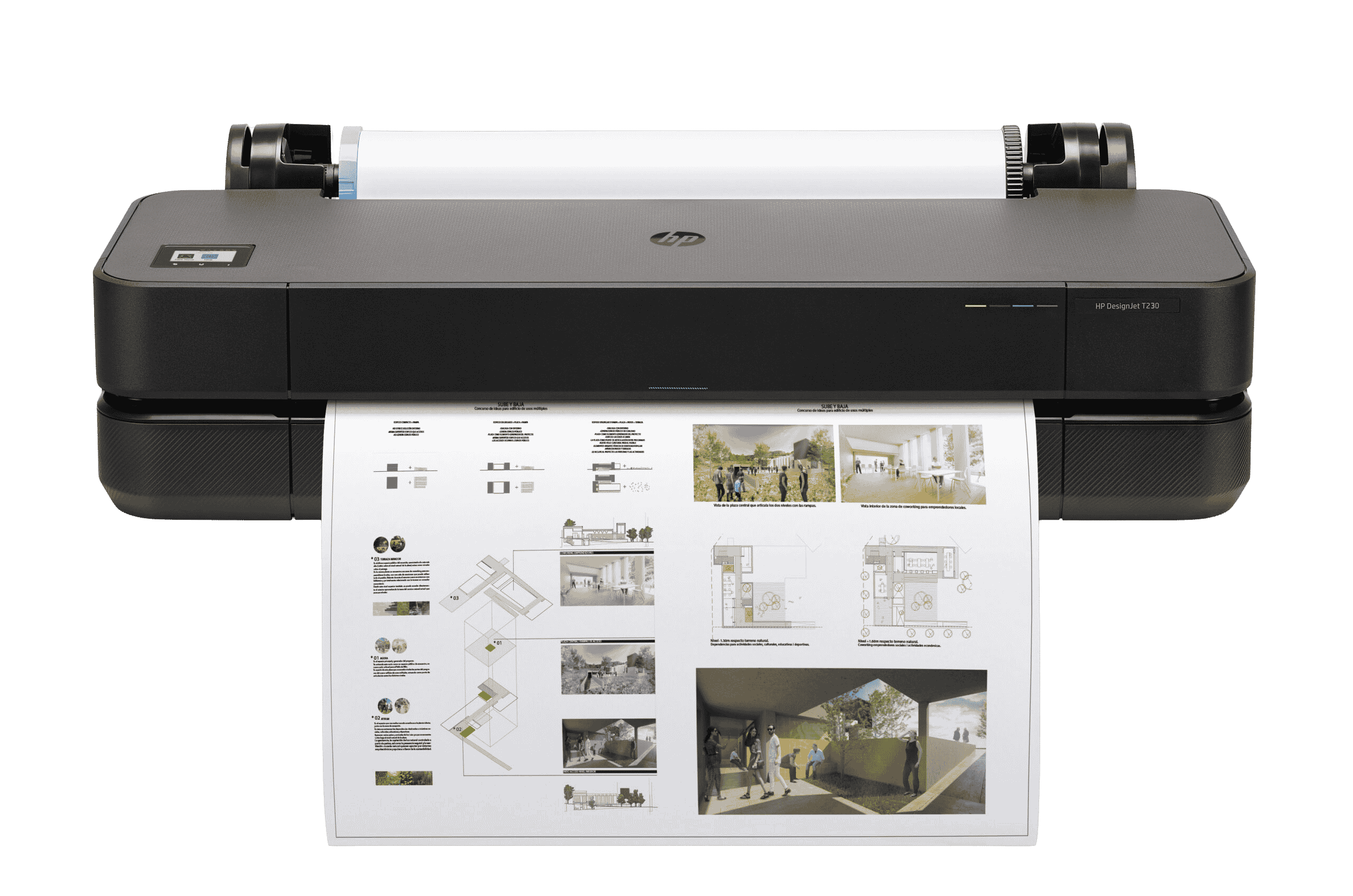
HP DesignJet T230 Plotter - HP DesignJet T230 24-inch plotter, the most affordable entry point to professional A1 in-house plotting for small practices

HP DesignJet T230 — 24-inch A1 plotter for sole practitioners and small studios, compact enough for any desk or studio bench

~35s A1 print speed. Designed for low-to-moderate weekly volumes under 10 A1 sheets.
24" Single format: 610 mm max print width. A1 is its primary output format.
HP 712 Same Bright Office ink system and ±0.1% line accuracy as the T630 and T650.
ENERGY STAR EPEAT Gold EU RoHS WEEE HP Warranty 1 Year

Why the HP DesignJet T230 Makes Sense for Your Practice

The T230 is the lowest-cost entry point to professional-grade A1 plotting. It is built for the sole practitioner, the newly registered practice, and the small studio that needs to stop paying bureau rates without overcommitting on machine capability they will not use.

💰

Lowest Entry Cost to Professional A1 Plotting

The T230 is the most affordable way to bring A1 plotting in-house in the HP DesignJet range. At Johannesburg and Cape Town bureau rates of R15 to R25 per A1 sheet, a practice printing 5 to 10 sheets per week spends R300 to R1,000 per month on outsourced plotting. The T230 reaches break-even within 12 to 18 months at this volume, and every sheet printed after that is cost recovered. For a newly established practice managing project-based cash flow, this is the right machine to start with.
📡

Wi-Fi Ready: No Cabling Required in Your Studio

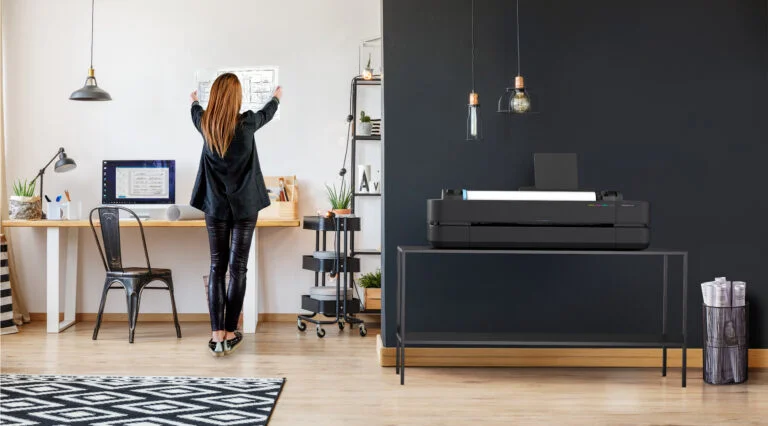
The T230 connects via Wi-Fi 802.11 b/g/n and USB. For a home office, a small rented studio, or a co-working space where running Ethernet cable to a shared printer is not practical, Wi-Fi is the correct solution. The HP Smart App allows remote job submission and queue management from any device on the same network. Note: the T230 does not include Gigabit Ethernet. Practices that require a wired network port for shared office printing should consider the HP DesignJet T630, which includes Gigabit Ethernet alongside Wi-Fi.

🎨

Same HP 712 Print Quality as the T630 and T650

The T230 uses the same HP 712 Bright Office ink system as the T630 and T650: pigment black for sharp CAD line work, dye-based CMY for colour presentations. Line accuracy is identical at ±0.1%. Print resolution reaches up to 2400 x 1200 optimised dpi. Choosing the T230 means accepting lower throughput and fewer connectivity options. It does not mean accepting lower print quality. A construction drawing printed on the T230 is indistinguishable from the same drawing printed on the T650.

🖱️

HP Click: One-Click PDF Plotting, No RIP

AEC buyers export PDFs from AutoCAD, Revit, ArchiCAD, or Civil 3D and expect them to print. HP Click accepts multiple PDF files, detects page sizes automatically, and sends the entire batch in one click. No driver configuration. No RIP. No specialist operator. The same workflow used on the T650 runs identically on the T230. For a small practice submitting a 5-drawing tender set from a home office, HP Click eliminates the most time-consuming step in the print workflow.

HP DesignJet T230 Plotter - Where does print fit in AEC's hybrid future — large format printing in architecture and engineering
HP DesignJet T230 Plotter - HP DesignJet solutions for construction — printing on-site and in-office construction drawings
HP DesignJet T230 Plotter - HP Smart App — print from mobile and manage jobs remotely via Wi-Fi

What Our Clients Say

South African architects, engineers, and designers on working with Graficomp.

★★★★★ "

I registered the practice six months ago and the T230 was the right call. We produce around six A1 sheets per week. It does everything we need without a large upfront cost. Graficomp set it up over Wi-Fi and had HP Click running in under an hour.

ML
Mpho L. Architect · Sole Practitioner · Johannesburg
★★★★★ "

We work from a rented studio and could not run network cabling. The T230 connects over Wi-Fi and prints reliably from AutoCAD. For our volume it is more than enough, and the line quality on technical drawings is exactly what we needed.

SR
Sanele R. Director · Interior Architecture Studio · Cape Town
★★★★★ "

We were paying the bureau R700 a month for 8 sheets a week. The T230 paid for itself in just over a year. Now I print at 10pm before a morning deadline. That freedom alone is worth more than the cost saving.

HV
Heinrich V. Principal · Landscape Architecture Practice · Pretoria
★★★★★ "

The rental option made it an easy decision. We get a professionally installed machine, Graficomp handles any service issues, and the monthly cost is predictable. For a practice at our stage, that structure works perfectly.

NB
Nokwanda B. Partner · Quantity Surveying Practice · Durban
★★★★★ "

I work from a home office and space is limited. The T230 fits on a desk. The print quality is the same as the larger plotters — I checked. For 5 to 8 A1 drawings a week it is everything I need without a machine that dominates the room.

CJ
Corné J. Civil Engineer · Freelance Consultant · Stellenbosch
★★★★★ "

I registered the practice six months ago and the T230 was the right call. We produce around six A1 sheets per week. It does everything we need without a large upfront cost. Graficomp set it up over Wi-Fi and had HP Click running in under an hour.

ML
Mpho L. Architect · Sole Practitioner · Johannesburg
★★★★★ "

We work from a rented studio and could not run network cabling. The T230 connects over Wi-Fi and prints reliably from AutoCAD. For our volume it is more than enough, and the line quality on technical drawings is exactly what we needed.

SR
Sanele R. Director · Interior Architecture Studio · Cape Town
★★★★★ "

We were paying the bureau R700 a month for 8 sheets a week. The T230 paid for itself in just over a year. Now I print at 10pm before a morning deadline. That freedom alone is worth more than the cost saving.

HV
Heinrich V. Principal · Landscape Architecture Practice · Pretoria
★★★★★ "

The rental option made it an easy decision. We get a professionally installed machine, Graficomp handles any service issues, and the monthly cost is predictable. For a practice at our stage, that structure works perfectly.

NB
Nokwanda B. Partner · Quantity Surveying Practice · Durban
★★★★★ "

I work from a home office and space is limited. The T230 fits on a desk. The print quality is the same as the larger plotters — I checked. For 5 to 8 A1 drawings a week it is everything I need without a machine that dominates the room.

CJ
Corné J. Civil Engineer · Freelance Consultant · Stellenbosch

Bureau Pricing: What Outsourcing Costs Your Practice Annually

Before investing in an in-house plotter, it helps to see what the bureau is actually costing you. At typical Johannesburg and Cape Town bureau rates of R15 to R25 per A1 sheet, even low weekly volumes add up quickly across a year.

Weekly A1 Volume Estimated Bureau Cost (per month) Estimated Bureau Cost (per year) Guidance
5 to 10 sheets R300 – R1,000 R3,600 – R12,000 HP DesignJet T230 (this page) — entry-level A1 plotting, Wi-Fi, lowest cost
15 to 20 sheets R900 – R2,000 R10,800 – R24,000 HP DesignJet T630 — Ethernet, 24-in or 36-in, auto sheet feeder, faster throughput
20 to 50 sheets R1,200 – R5,000 R14,400 – R60,000 HP DesignJet T650: faster output, automatic sheet feeder, 25s per A1
100+ sheets R6,000+ R72,000+ HP DesignJet T1600. Bureau outsourcing is not viable at this volume

These estimates are based on typical bureau rates in Johannesburg and Cape Town as of 2026. Contact Graficomp for a cost comparison based on your actual weekly volume and drawing complexity.

Ink efficiency advantage: HP states the T230 uses up to 95% less ink for routine maintenance compared to competitive alternatives, yielding more pages from the same cartridge investment. The HP 712 ink system uses only four cartridges and the black pigment cartridge is available in an 80 ml high-yield option. For a sole practitioner watching consumable costs closely, this matters over the machine's lifespan.

Workflow and Connectivity: From AutoCAD to Printed Drawing

AutoCAD, Revit, and Civil 3D Compatibility

The HP DesignJet T230 works with AutoCAD, Revit, ArchiCAD, Civil 3D, MicroStation, and any application that exports to PDF or sends output through a standard Windows or macOS print driver. No special plugin or add-in is required. The HP-GL/2 print language is natively supported for direct driver output from all major AEC software packages.

AutoCAD compatible
Revit compatible

HP Click Software

HP Click accepts PDF, JPEG, TIFF, DWF, and HP-GL/2 files. Drop multiple files in and the software detects the page size of each file automatically. One click sends the entire batch to the printer. No manual driver selection. No page-by-page size configuration. For a sole practitioner exporting 5 PDFs from AutoCAD for a tender submission, this eliminates the most time-consuming step in the print workflow.

HP Click is not a RIP. AEC buyers do not need a RIP for standard CAD plotting. The T230 uses standard Windows and macOS drivers plus HP Click. If you have been told you need a RIP for CAD plotting, you have been misinformed.

Connectivity Options

ConnectionDetails
Wi-Fi802.11 b/g/n. Wireless printing from desktops and laptops. Suitable for home offices, small studios, and co-working spaces.
Hi-Speed USB 2.0Direct connection for single-user setups. No network required.
HP Smart AppRemote job submission, queue management, and printer status from any mobile device or desktop.
Gigabit Ethernet not included. The T230 is designed for Wi-Fi and USB connectivity. If your office requires a wired network connection so that multiple users can share the plotter from a single fixed IP, the HP DesignJet T630 includes Gigabit Ethernet (1000Base-T) alongside Wi-Fi and USB.
Mac compatible: The HP DesignJet T230 includes a raster driver for both Windows and macOS. Mac users print directly without additional software. HP Click is available for macOS. This is a genuine advantage over some competing plotters that are Windows-only, and is relevant for the significant number of architecture and design practices running macOS.

Technical Precision: Line Accuracy and Print Quality

Line Accuracy

The HP DesignJet T230 achieves ±0.1% line accuracy on drawings printed on HP Heavyweight Coated paper in Best or Normal mode. This is the same specification as the T630 and T650. HP Bright Office Inks deliver up to 31% more line accuracy and up to 65% more colour gamut compared to competitive alternatives in equivalent draft print modes, based on HP internal testing against the Canon TM-305.

For AEC buyers, line accuracy is the non-negotiable quality metric. Construction dimensions, site plans, and engineering details print at the precision the drawing was authored at. The minimum reproducible line width is 0.02 mm. Choosing the T230 over the T630 is a throughput and connectivity trade-off, not a quality trade-off.

HP Bright Office Inks

The T230 uses a dual-system ink approach: pigment-based black for sharp, high-contrast CAD line work, and dye-based cyan, magenta, and yellow for colour presentations and renderings. The same plotter handles both technical CAD drawings and full-colour presentation renders without an ink change or mode switch.

HP DesignJet T230 Plotter - HP 712 ink cartridge family — pigment black and dye CMY for the HP DesignJet T230

HP 712 Bright Office Inks: pigment black and dye-based CMY — shared across the T230, T630, and T650

Printhead Replacement

The T230 uses a single CMYK printhead (HP 713 Printhead Replacement Kit, part number 3ED58A). Head replacement is a user-serviceable operation: the printer guides you through the process via its front panel display, the replacement takes approximately 10 to 15 minutes, and no technician visit is required. This is the same printhead used in the T630 and T650.

Media Handling

Media TypeSpecification
Roll feed279 to 610 mm roll width. Automatic horizontal cutter.
Manual sheet feedUp to 610 x 1897 mm. 60 to 220 g/m².
Automatic sheet feederNot included. The T230 uses manual sheet feed only.
Media thicknessUp to 0.3 mm.
No automatic sheet feeder. The T230 does not include an automatic sheet feeder. Mixed-format printing (for example, A4 written reports alongside A1 drawings in a single batch) requires manual media handling between jobs. If automatic switching between cut-sheet and roll feed is required, the HP DesignJet T630 includes this feature.

Environmental Credentials

The HP DesignJet T230 is ENERGY STAR certified and EPEAT Gold registered. It consumes less than 18 W while printing and under 5.6 W in ready mode, making it one of the lowest-power plotters in the DesignJet range. FSC-certified papers and recyclable HP media are available through the HP large format materials portfolio.

For AEC practices responding to green building or sustainability-rated tenders, these certifications are procurement qualifiers, not marketing decoration.

ENERGY STAR certified ENERGY STAR Certified
HP ink efficiency Ink Efficiency
♻️
Low Power Consumption
Configuration note: The most common complaints about HP DesignJet T-series plotters on HP support forums relate to speed and auto-cutter behaviour after firmware updates, not to the hardware itself. When correctly configured with HP Click and the HP-GL/2 driver on a supported operating system, the T230 performs at its rated speed. Graficomp includes driver and firmware setup as part of every installation to ensure the plotter is configured correctly from day one.

Full Specifications

Source: HP DesignJet T230 product datasheet (HP part number 5A0R9A). All specifications metric primary, imperial in brackets.

SpecificationValue
Print TechnologyHP Thermal Inkjet
Ink SystemHP 712 Bright Office Inks: dye-based (C, M, Y), pigment-based (K)
Ink Cartridges4 (Cyan 29 ml, Magenta 29 ml, Yellow 29 ml, Black 38 ml or 80 ml)
Max Print Width610 mm (24 inches)
Print Speed (A1)Approximately 35 seconds per A1/D page
Print ResolutionUp to 2400 x 1200 optimised dpi
Ink Drop Size5.5 pl (C, M, Y); 12 pl (K)
Printheads1 (CMYK)
Printhead Part NumberHP 713 DesignJet Printhead Replacement Kit (3ED58A)
Line Accuracy±0.1%
Minimum Line Width0.02 mm
Roll Size Supported279 to 610 mm
Max Substrate Thickness0.3 mm
Sheet Feed (automatic)Not included. Manual sheet feed only.
Sheet Feed (manual)Up to 610 x 1897 mm. 60 to 220 g/m².
Media HandlingRoll feed, manual sheet feed, automatic horizontal cutter
RIP / Print SoftwareHP Click (included; no RIP required for CAD plotting)
Print LanguagesHP-GL/2, HP-RTL, CALS G4, JPEG, URF
DriversRaster driver for Windows and macOS
ConnectivityWi-Fi 802.11 b/g/n, Hi-Speed USB 2.0 (Gigabit Ethernet not included)
Remote ManagementHP Smart App (mobile and desktop)
Memory512 MB
Hard DiskNone
Power Consumption<18 W (printing), <5.6 W (ready), <1.8 W (sleep), <0.2 W (standby)
Power Requirements220-240 V (±10%), 50/60 Hz (±3 Hz)
Operating Temperature5 to 40 °C
Operating Humidity20 to 80% RH
Dimensions (W x D x H) with standApproximately 1070 x 435 x 851 mm
WeightApproximately 12.5 kg (with stand)
Environmental CertificationsENERGY STAR, EPEAT Gold, WEEE, EU RoHS, REACH, ErP
Warranty1-year limited hardware warranty
HP Part Number5A0R9A

Which HP DesignJet is Right for Your Practice?

The T230 is the right starting point for many small practices. But not every practice needs it, and some will outgrow it. This is the honest routing guide.

Your SituationRecommended Model
Sole practitioner or very small studio, fewer than 10 A1 per week, Wi-Fi sufficient, lowest entry costHP DesignJet T230 (this page)
Small practice, 10 to 20 A1 per week, Ethernet required, 24-in or 36-in option, auto sheet feederHP DesignJet T630
Small to mid practice, 20 to 50 A1 per week, faster output (25s vs 35s), automatic sheet feeder includedHP DesignJet T650
Growing workgroup, 50+ A1 per day, multiple concurrent users, higher duty cycleHP DesignJet T1600
Needs scanning, copying, and document control alongside large format printingHP DesignJet T830 MFP or T850/T950 MFP (Professional Series)
Need to print signage, vehicle graphics, or wide-format production graphicsHP Latex 630 (separate product category)

The T230 is the right choice if

  • You print fewer than 10 A1 drawings per week
  • Lowest entry cost is the primary decision factor
  • Wi-Fi connectivity is sufficient for your setup
  • You are a sole practitioner or very small practice
  • A0 output is not a requirement (24-inch only)

Upgrade to T630 if you need

  • Gigabit Ethernet for wired office network
  • A 36-inch option for A0 output on roll
  • An automatic sheet feeder for mixed-format batches
  • Volume above 10 A1 sheets per week

The HP DesignJet T630 includes Gigabit Ethernet, a 36-inch option, and an automatic sheet feeder at the next price point up.

Upgrade to T650 if you need

  • Faster throughput: 25 seconds per A1 versus 35 on the T230
  • Volume above 20 A1 sheets per week
  • Automatic sheet feeder for tender sets with mixed page sizes

The HP DesignJet T650 is the correct step when weekly volume becomes a workflow pressure point.

Need scanning and document control? The HP DesignJet T830 MFP and the T850 MFP / T950 MFP add integrated scanning and copying. Contact Graficomp to discuss which MFP configuration suits your workflow and budget.

Why Graficomp

Graficomp does not sell you a plotter and leave you to set it up. Every HP DesignJet purchase includes on-site installation, driver and network configuration, and operator training. Graficomp's engineering team holds an estimated 40 to 50 years of combined hands-on experience with HP DesignJet and Latex printer ranges.

HP ASDP Certified Service Centre Authorised for in-warranty and out-of-warranty HP DesignJet service. No third-party repair shops.
Installation and Commissioning On-site setup: physical placement, Wi-Fi configuration, HP Click installation, print quality validation before handover.
Operator Training Included HP Click workflow, roll media loading, manual sheet feed, ink cartridge replacement, and driver configuration for your operating system.
Rental and Financing Available 36, 48, or 60-month rental structures. Fixed monthly cost, HP-certified service included. No capital expenditure required.

Who We Serve

  • Architecture and Design
  • Civil and Structural Engineering
  • Land Surveying and GIS
  • Construction and Project Management
  • Quantity Surveying
  • Municipal and Government Planning
  • University and Education
  • Interior Design and Rendering
Aerial view of Graficomp premises
Graficomp team in the demo room
Graficomp staff in the showroom
HP Amplify Partner Programme

HP Amplify Commercial Specialist

HP Amplify is HP's global partner programme. Specialist status requires demonstrated technical competency, customer satisfaction metrics, and a minimum volume of certified deployments. Graficomp holds designations across two solution areas plus Synergy Commercial Partner status.

When you buy an HP DesignJet T230 through Graficomp, you are buying through a partner HP recognises as qualified to deliver the full solution: hardware, installation, training, and ongoing service.

HP Amplify Large Format Design Solutions Specialist badge
Large Format Design Solutions Specialist HP-certified competency in DesignJet technical plotter deployment for AEC and design environments.
HP Amplify Large Format Production and Textile Solutions Specialist badge
Large Format Production and Textile Solutions Specialist HP-certified across HP Latex production and textile printing platforms.
HP Amplify Synergy Commercial Partner badge
Synergy Commercial Partner HP Amplify Commercial Synergy Partner status recognising Graficomp's multi-portfolio HP expertise.

Service Coverage

Graficomp installs and services HP DesignJet plotters across South Africa. HP delivers equipment free to any SA location.

Johannesburg (Head Office) Midrand / Kyalami Pretoria / Centurion Krugersdorp / West Rand Isando / Kempton Park Jet Park / Boksburg Meadowdale / Germiston Longmeadow / Linbro Park Cape Town (Tokai) Durban Stellenbosch / Technopark Paarl · Somerset West · George
Western Cape AEC practices: Graficomp's Cape Town office in Tokai serves the entire Western Cape region with on-site installation and support. This includes architecture practices in Stellenbosch, engineering consultancies in Paarl, GIS teams at universities in the Winelands, and civil engineering firms along the Garden Route from George to Mossel Bay. HP delivers equipment free. There is no freight surcharge for the Western Cape.

HP DesignJet T230: Frequently Asked Questions

Answers written to stand alone, optimised for AI-assisted search and passage retrieval.

What is the difference between the HP DesignJet T230 and T630?

The HP DesignJet T230 and T630 use the same HP 712 ink system and produce the same ±0.1% line accuracy. The differences are connectivity, media handling, format options, and throughput. The T230 connects via Wi-Fi and USB only — it does not include Gigabit Ethernet. The T630 includes Gigabit Ethernet alongside Wi-Fi and USB. The T230 uses manual sheet feed only — it does not include an automatic sheet feeder. The T630 includes an automatic sheet feeder. The T230 is available in 24-inch only. The T630 is available in 24-inch and 36-inch formats. The T230 prints an A1 in approximately 35 seconds. The T630 prints an A1 in approximately 30 seconds. The T230 has 512 MB of memory versus 1 GB in the T630. If Wi-Fi is sufficient, you print fewer than 10 A1 sheets per week, and you do not need a 36-inch format or automatic sheet feeder, the T230 is the correct choice at lower entry cost. If any of those requirements apply, the T630 is the correct upgrade.

Does the HP DesignJet T230 connect to Ethernet?

No. The T230 does not include Gigabit Ethernet. It connects via Wi-Fi 802.11 b/g/n and Hi-Speed USB 2.0 only. For most sole practitioners and small studios — particularly home offices, rented studios, and co-working spaces — Wi-Fi is sufficient and no cabling is required. If your office network requires a wired Ethernet connection so that multiple users can share the printer from a fixed IP address, the HP DesignJet T630 includes Gigabit Ethernet (1000Base-T) alongside Wi-Fi and USB.

Does the HP DesignJet T230 have an automatic sheet feeder?

No. The T230 does not include an automatic sheet feeder. It uses roll feed and manual cut-sheet feed only. For most sole practitioners printing A1 CAD drawings on roll media, this is not a constraint. If your workflow requires printing mixed-format batches (for example, A4 written reports and A1 drawings in a single tender set without manual intervention between jobs), the HP DesignJet T630 includes an automatic sheet feeder and handles these mixed-format batches without manual media switching.

Can the HP DesignJet T230 print A0 drawings?

No. The T230 is a 24-inch (610 mm) plotter only. Its maximum roll width is 610 mm, which accommodates A1 (594 mm width) and all smaller formats. A0 requires a minimum print width of 841 mm, which exceeds the T230's maximum. If A0 output is a regular requirement, you need a 36-inch model. The HP DesignJet T630 36-inch and HP DesignJet T650 both support A0 on roll media.

Is the HP DesignJet T230 fast enough for a small architectural practice?

For practices printing fewer than 10 A1 sheets per week, yes. At approximately 35 seconds per A1, a 5-drawing set completes in roughly 3 to 4 minutes including processing time. A 10-drawing tender set takes approximately 6 to 8 minutes. This is significantly faster than sending drawings to a bureau and waiting for collection. The T230 is not designed for high-volume workloads. If your practice is regularly printing 15 or more A1 sheets per week, or if queue pressure from multiple concurrent users is a concern, the HP DesignJet T630 (30 seconds per A1) or HP DesignJet T650 (25 seconds per A1) are more appropriate.

How does the HP DesignJet T230 connect to AutoCAD and Revit?

No special software or plugin is required. The T230 works with any application that outputs to PDF or uses a standard Windows or macOS print driver. For batch PDF plotting, HP Click software accepts multiple files and prints them in one click with automatic page-size detection. The HP-GL/2 print language is natively supported for direct driver output from AutoCAD, Revit, ArchiCAD, Civil 3D, and MicroStation. There is no add-in to install and no RIP required. Graficomp installs and configures HP Click and the HP-GL/2 driver as part of every T230 installation.

What ink cartridges does the HP DesignJet T230 use, and how long do they last?

The T230 uses HP 712 ink cartridges. Black is available in 38 ml and 80 ml sizes; cyan, magenta, and yellow are 29 ml each. HP states that 20 ml of ink yields approximately 101 A1/D pages, accounting for maintenance routines. The T230 uses up to 95% less ink for maintenance compared to competitive alternatives, according to HP's published data. For a sole practitioner printing 5 to 10 A1 sheets per week, the standard cartridge sizes will last several months before replacement is required.

At what weekly volume does in-house plotting become more economical than the bureau?

Even at low weekly volumes, in-house plotting starts to compete with bureau pricing within 12 to 18 months. At typical Johannesburg and Cape Town bureau rates of R15 to R25 per A1 sheet, a practice producing just 5 sheets per week spends R300 to R500 per month on outsourced plotting, or R3,600 to R6,000 per year. At 10 sheets per week, that rises to R600 to R1,000 per month, or R7,200 to R12,000 per year. The T230's lower entry cost means break-even arrives sooner than with higher-spec models. Contact Graficomp for a cost comparison based on your actual volume.

Does the HP DesignJet T230 support printing from a Mac?

Yes. HP provides a raster driver for macOS. The HP Smart App is also available on Mac for remote job submission and printer management via Wi-Fi. HP Click is available for macOS. The T230 works identically on Windows and macOS for standard PDF plotting workflows. No additional drivers or software are required beyond the standard HP driver package, which Graficomp installs as part of commissioning.

Who installs and commissions the plotter at my office?

Graficomp provides on-site installation for every HP DesignJet purchase. This includes physical setup and placement, Wi-Fi configuration, HP Click software installation, driver configuration for your operating system, and a short operator training session covering roll loading, manual sheet feed, ink cartridge replacement, and standard PDF plotting workflow. You do not need to set it up yourself. Graficomp's team validates print quality before handover so you know the plotter is correctly configured from day one.

Is rental or financing available for the HP DesignJet T230?

Yes. Graficomp offers 36, 48, and 60-month rental structures for HP DesignJet plotters. The monthly cost covers the hardware, HP-certified installation, and access to Graficomp's HP ASDP service. Rental converts a capital expenditure into a predictable operating cost, which is the preferred structure for many newly established or growing practices managing project-based cash flow. Contact Graficomp for a rental quote based on your specific configuration.

When should I consider upgrading from the T230 to the T630?

The primary signals are volume, connectivity, and format requirements. Consider the HP DesignJet T630 when: (1) your weekly output is consistently above 10 A1 sheets per week and queue time is becoming a frustration; (2) your office requires a wired Ethernet connection to share the printer reliably across multiple workstations; (3) you need a 36-inch model for regular A0 output; or (4) you need an automatic sheet feeder to handle mixed A4 and A1 print batches without manual media switching. The T630 delivers identical print quality to the T230 — the upgrade is purely about connectivity and workflow features.

Get a Quote

Tell us about your practice and we will prepare a cost comparison showing bureau spend versus in-house plotting cost based on your actual weekly volume.

On-site installation and Wi-Fi configuration included
Operator training included with every purchase
24-inch format — the most compact DesignJet A1 plotter
Rental from 36 months available
HP ASDP certified service partner
Free delivery anywhere in South Africa
Johannesburg · Cape Town · Durban
PL30 Contact - T230

Graficomp cc · Randburg, Johannesburg · 011 792 1348 · sales@graficomp.co.za

HP Amplify Commercial Specialist · Large Format Design Solutions · Large Format Production and Textile Solutions · Synergy Commercial Partner.

HP Amplify Commercial Specialist badges and insignias are used under licence from HP Inc. per the HP Amplify Partner Programme Brand Guide FY26. Graficomp cc is an authorised HP reseller and certified HP ASDP service partner. HP DesignJet, HP Click, and HP Bright Office Inks are trademarks of HP Inc.

Page last reviewed: June 2026. Specifications sourced from HP DesignJet T230 product datasheet (5A0R9A). Contact Graficomp to verify current pricing and availability before purchase.

Graficomp on LinkedIn